

Contribution Studio — POC Architecture & Developer Guide
Every river needs a voice. This document outlines the Proof of Concept (POC) for Contribution Studio — an AI-assisted article creation platform that empowers anyone working toward river conservation to generate rich, beautifully structured articles and share them with thousands on Nadikosh
What Are We Building?
Section titled “What Are We Building?”Contribution Studio is an AI-assisted article creation tool built inside the Nadikosh Astro + Starlight wiki at the route /contribute. It allows any contributor — regardless of technical background — to write structured, component-rich MDX articles for the Nadikosh river knowledge base.
It is a platform where field workers, researchers, historians, students, activists, and community leaders can have a structured conversation with AI about problems they’re witnessing or researching related to rivers — then generate a complete, publication-ready article series.
Check out the demoTarget Audience
Section titled “Target Audience”The target contributor is NOT a developer. They could be:
- A ground worker who has seen illegal sand mining damage a riverbed
- A researcher who wants to document the lack of testing equipment in India
- A professor wanting to educate people about river water quality
- A historian or saint writing about the sacred history of a river
- A local activist documenting river-related policies and violations
- A fisherman or boat worker recording how river changes affect their livelihood
- An Ayurveda practitioner connecting river health to human health
- A photographer or videographer documenting visual evidence of pollution
- A student working on an environmental dissertation
- A panchayat member or government official reporting governance issues
- A diaspora Indian documenting their ancestral river’s history
The Studio removes all technical friction. A contributor types an idea, the AI drafts a full article with components and image prompts, the contributor edits it in a friendly editor, and downloads a ready-to-publish .mdx file.
The Vision
Section titled “The Vision”Imagine a ground worker in the Yamuna basin discovers illegal sand mining damaging river beds. They come to Nadikosh, describe the problem in plain language, and within minutes get:
- ✅ A 5–10 article series on sand mining impacts
- ✅ Inline suggestions for interactive charts showing mining trends
- ✅ Image prompts ready for visualization
- ✅ Component recommendations (data comparison, before/after sliders, educational quizzes)
- ✅ A clean, publication-ready MDX file they can share
All without having great writng skill, writing code or understanding components.
View sample AI generated articleThe Problem We’re Solving
Section titled “The Problem We’re Solving”Current State: High Barriers to Knowledge Sharing
Section titled “Current State: High Barriers to Knowledge Sharing”Who wants to write about rivers but faces friction?
| Audience | Their Challenge | Impact |
|---|---|---|
| 🏗️ Ground Workers | Lack writing skills, time to structure content | River issues stay local, undocumented |
| 🔬 Researchers | Unsure how to translate technical findings into accessible stories | Research impact limited to academic circles |
| 👨🏫 Professors | Want to teach river science but materials are scattered or outdated | Students use fragmented sources |
| 📜 Historians & Saints | Sacred knowledge about rivers isn’t digitized or organized | Cultural knowledge at risk of loss |
| 👨💼 Policy Advocates | Want to publish policy analysis but lack visual/interactive tools | Arguments stay text-heavy, harder to engage readers |
| 👨🎓 Students | Working on environmental projects but need platforms to publish findings | Work disappears after semester ends |
| 📸 Photographers & Videographers | Have powerful visual evidence of pollution but no narrative structure | Images lack context, message doesn’t stick |
| 🎯 Diaspora Indians | Emotionally connected to ancestral rivers but don’t know where to start | Global perspective on Indian rivers stays untapped |
What Contribution Studio Fixes
Section titled “What Contribution Studio Fixes”POC Overview
Section titled “POC Overview”Tech Stack
Section titled “Tech Stack”| Layer | Technology | Notes |
|---|---|---|
| Framework | Astro SSR (existing Nadikosh) | Needs SSR adapter: @astrojs/node or @astrojs/vercel |
| Island | React client:load | Contribution Studio is one large React island |
| Rich Text Editor | TipTap | Writer-friendly, supports custom nodes for components |
| AI API | Anthropic Claude API | Via Astro API route /api/generate-article |
| Component Props UI | Custom form builder | Labeled fields — no raw JSON exposed to user |
| Animations | Motion for React (motion) | npm install motion, import from motion/react |
| Styling | Existing Nadikosh theme (Flexoki) | Starlight + starlight-theme-flexoki |
| Publishing (POC) | Download .mdx file | User manually adds to Git repo |
| Publishing (Stretch) | GitHub PR bot | Auto-creates PR with MDX file |
| CMS Eval (Parallel POC) | KeyStatic / DecapCMS / PageCMS | Separate investigation track |
Landing Page Experience
Section titled “Landing Page Experience”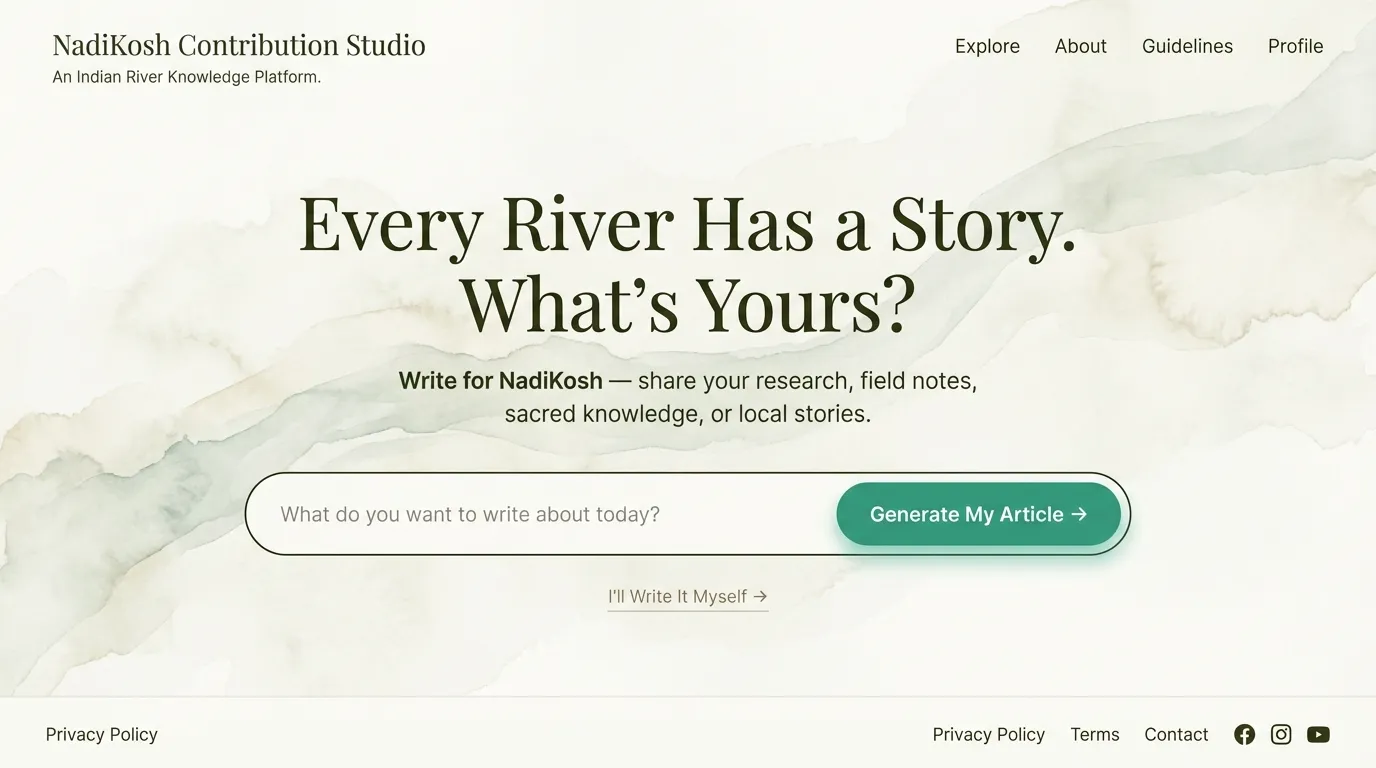
- Process 1 (Auto Generate) → Claude AI writes article from idea
- Process 2 (Manual) → User writes manually in editor
The Two Processes — Overview
Section titled “The Two Processes — Overview”Think of the Contribution Studio landing page like the Google homepage: deliberately minimal, but hiding enormous power behind that simplicity.
Process 1 — “AI-Guided Writing” (The Main Path)
Section titled “Process 1 — “AI-Guided Writing” (The Main Path)”Who it’s for: Anyone with a raw thought — a ground worker who saw illegal sand mining, a saint who wants to document sacred river texts, a student with a pollution report idea.
Flow:
- User lands on the page and sees the prompt: “What do we want to write about today?”
- They type their raw idea in natural language — no structure needed
- They hit “Generate My Article”
- Claude API receives the idea bundled with your full instruction context (component list, article guide, Nadikosh sections)
- The MDX editor opens with a fully drafted article — headings, paragraphs, inline image prompt callouts, and component suggestion cards already placed inside the text
- User reviews, edits text, swaps components via the form panel, refines image prompts
- Hits “Download MDX” → gets a ready
.mdxfile or Publish -> Auto publishes the article on our NadiKosh
The key experience: The writer never sees raw MDX code. They see a living document with friendly callout blocks where images and components will go.
Process 2 — “Write It Yourself” (The Manual Path)
Section titled “Process 2 — “Write It Yourself” (The Manual Path)”Who it’s for: An expert researcher, professor, or historian who already knows exactly what they want to say and just needs a structured, power-assisted editor to write it in.
Flow:
- User clicks “I’ll Write It Myself →” (see button text below)
- A section selector appears — “Which part of Nadikosh are you writing for?” (River Science / Sacred Rivers / Field Reports / Policies / Tech & Tools)
- The MDX editor opens empty but section-aware — the toolbar and component suggestions are pre-filtered for the chosen section
- Writer types freely, inserts components from the panel when needed, adds image prompt callouts manually
- Hits “Download MDX” → same output as Process 1
The key experience: Full creative control, but with smart guardrails — the right components are already surfaced, the right Nadikosh frontmatter is pre-filled, nothing is locked.
4. The Hybrid Editor (Core Feature)
Section titled “4. The Hybrid Editor (Core Feature)”This is the most important component of the entire POC. Both processes converge here.
Layout
Section titled “Layout”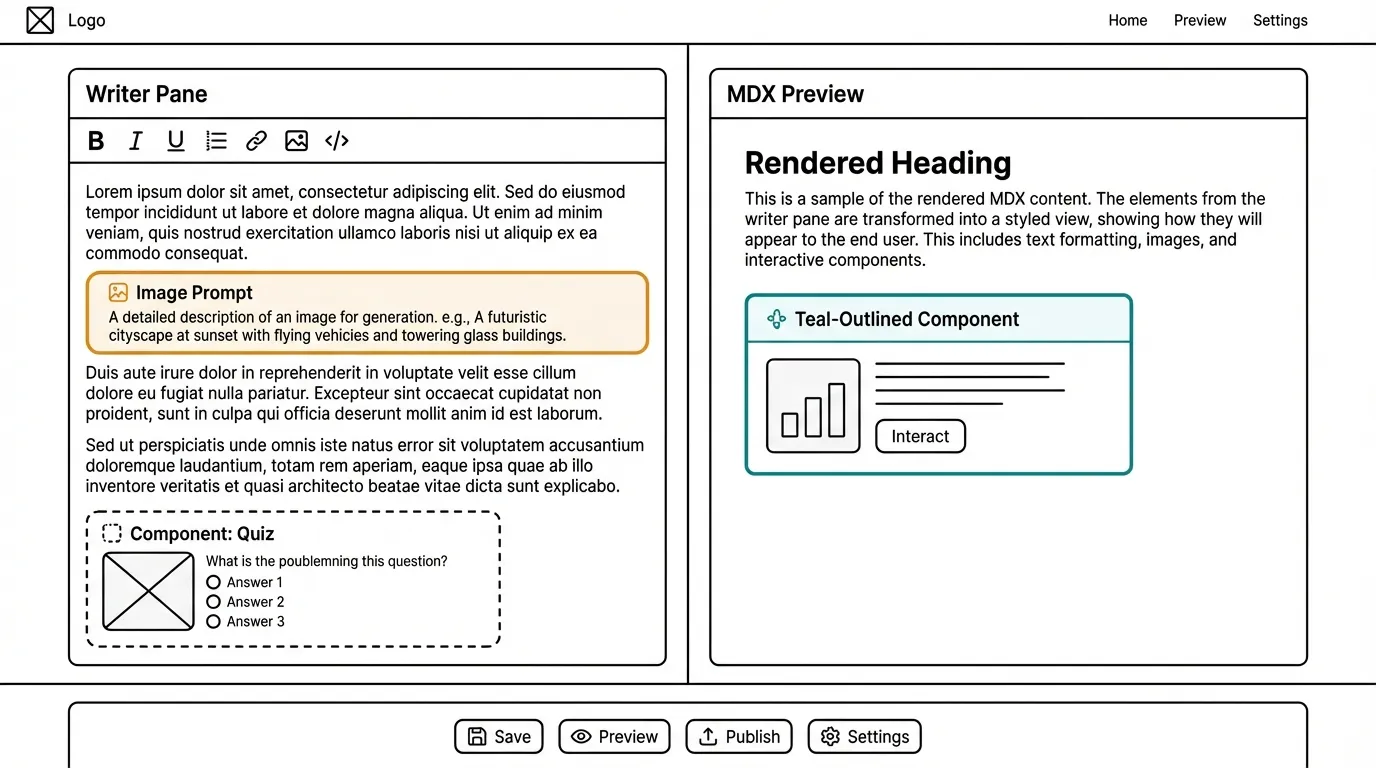
Key Editor Features
Section titled “Key Editor Features”Component Insertion
- Clicking “Insert Component” opens a slide-in panel
- Contributor picks from the Nadikosh component library (20 components: Quiz, Charts, Maps, Sliders, etc.)
- A form-based prop editor (labeled fields, NO raw JSON) appears for the selected component
- On confirm, a visual component card is inserted into the editor at cursor position
- Raw MDX spec block is hidden from the writer but included in the exported MDX
Image Prompt Callouts
- Displayed as styled orange/yellow callout blocks in the editor
- NOT shown as raw text — they look like a hint card
- One-click copy button on each prompt
- Tooltip: “Paste this into Gemini or DALL-E to generate your image. Full version will have built-in image editor.”
MDX Export
- “Download MDX” button generates a complete
.mdxfile with:- Correct Astro + Starlight frontmatter
- Prose content
- Component spec blocks (as per
article_generation_guide.mdformat) - Image prompt comments
- Series metadata (if linked)
Core Components
Section titled “Core Components”1. Hybrid MDX Editor
Section titled “1. Hybrid MDX Editor”- Left pane: TipTap writer-friendly editor (no raw code visible)
- Right pane: Live MDX preview
- Image prompts displayed as styled callouts (copy-to-Gemini buttons)
- Component panel: Form-based interface to insert and edit components
2. Claude Integration
Section titled “2. Claude Integration”- Master system prompt (3 layers, ~7000–9000 chars)
- API route:
/api/generate-article - Input: User idea + selected article type
- Output: Complete MDX string with component slots + metadata
3. Component Library Panel
Section titled “3. Component Library Panel”- Dropdown to select component type (Quiz, BarChart, ZoneMap, etc.)
- Form fields for each prop (labeled, no raw JSON)
- Preview of component before insertion
- Edit existing components inline
4. Download & Publish
Section titled “4. Download & Publish”- Bare minimum: Download
.mdxfile button - Stretch: GitHub PR bot OR KeyStatic/DecapCMS integration
Bare Minimum POC (MVP) ✅
Section titled “Bare Minimum POC (MVP) ✅”What must work for MVP success:
-
/contributepage in Nadikosh (Astro SSR,client:loadisland) - Landing UI: textbox + “Manual Writing” button
- Process 1: Idea submission → Claude API → MDX in editor
- Process 2: Manual mode opens empty editor with section selector
- Hybrid Editor: TipTap left, plain text preview right
- Image prompts render as styled callouts
- Component picker with 3 sample components (Quiz, BarChart, ZoneMap)
- Form-based prop editors (no raw JSON visible)
- Component insertion creates visual cards in editor
- Download
.mdxfile with valid frontmatter and component specs - All 5 persona types tested with Claude
Good-to-Complete POC 🚀
Section titled “Good-to-Complete POC 🚀”Elevates MVP into a demo-ready product:
- Master system prompt fully optimized (all files condensed + tested)
- All 20 components have form-based editors
- Live preview actually renders Astro components (iframe sandbox)
- Image prompts copyable with one-click (Gemini, Midjourney tooltips)
- Contributor persona selector (adjusts Claude tone/structure)
- Article section selector (feeds context to Claude)
- Series linking UI (connect articles to existing series in Nadikosh)
- GitHub PR bot (submit MDX directly)
- CMS POC evaluation (KeyStatic vs. DecapCMS vs. DecapCMS)
- Mobile-friendly editor layout
- User accounts + saved drafts (optional)
Architecture Deep Dive
Section titled “Architecture Deep Dive”System Layers
Section titled “System Layers”Endpoint: POST /api/generate-article
// Request{  userIdea: string;        // "Sand mining damaging Yamuna beds"  articleType: string;     // "investigative" | "educational" | "policy" | "sacred"  personaType: string;     // "ground_worker" | "researcher" | "historian"  sectionId?: string;      // "pollution" | "conservation" | "culture"}
// Response{  mdxContent: string;      // Full MDX with component slots  imagePrompts: string[];  // ["Satellite view of sand mining...", ...]  suggestedComponents: {   // [{ id: "quiz", title: "Quiz", props: {...} }, ...]    id: string;    title: string;    props: Record<string, unknown>;  }[];  metadata: {    wordCount: number;    estimatedReadTime: number;    articleStructure: string[];  };}
Claude API call strategy:
- Send master system prompt (always)
- Send only relevant file sections based on
articleType - Limit context to ~9000 chars total
- Stream response for real-time UI updates
TipTap + MDX rendering
// Editor stateinterface EditorState {  content: string;           // Raw MDX  components: ComponentNode[]; // Inserted components  imagePrompts: ImagePrompt[];  metadata: ArticleMetadata;}
interface ComponentNode {  id: string;  type: "quiz" | "chart" | "map" | ...;  props: Record<string, unknown>;  position: number; // In document}
// Component insertion creates:// [Insert React Component Here]// **Component**: [category-ID] ComponentName// **Props**: { ...JSON... }
TipTap extensions:
- Custom component node type
- Image prompt callout block
- Markdown link handling for series
Right now: Articles stored in Git (Starlight repo)
Problem: Component JSON data bloats file size; client-side rendering expensive.
POC explores: MongoDB document store for components
// Component Templates (pre-built)db.componentTemplates.insertOne({  _id: "quiz-template-1",  componentId: "interactive-1",  name: "QuickKnowledgeCheck",  category: "interactive",  defaultProps: {    title: string;    questions: { text: string; options: string[]; correct: number }[];  },});
// User-Created Components (article-specific)db.userComponents.insertOne({  _id: ObjectId(),  articleId: "article-sand-mining-yamuna",  componentId: "quiz-yamuna-v1",  type: "interactive-1",  props: {    title: "How much sand is mined daily?",    questions: [      {        text: "Estimate daily sand extraction from Yamuna...",        options: ["100 tons", "1000 tons", "10,000 tons"],        correct: 2,      },    ],  },  createdAt: ISODate(),  authorId: "ground_worker_xyz",});
Benefit: Decouple component data from article files; query components separately; reuse across articles.
Claude API — Context Optimization Strategy
Section titled “Claude API — Context Optimization Strategy”A sample on how to use claude API:
Master System Prompt (always sent)
Section titled “Master System Prompt (always sent)”~2000 chars — core identity + output format rules
You are an AI article generation assistant for Nadikosh, a collaborative river knowledge base.
Your role: Convert user ideas about river problems into rich, publication-ready MDX articles.
Output format:- Markdown with embedded component slots- Format: [Insert React Component Here]- Followed by component spec block with JSON props- Image prompts as callout blocks: #Image prompt: "..."
Never hardcode data. Always generate flexible, reusable components.
Layer 2: Component Registry (always sent)
Section titled “Layer 2: Component Registry (always sent)”~3000 chars — condensed checklist + specs
## Available Components
[interactive-1] Quiz: Multiple choice knowledge checks[interactive-2] ProgressiveReveal: Step-by-step story revealing[infographic-1] LineChart: Trend visualization[infographic-2] BarChart: Category breakdown[multimedia-1] ZoneMap: Geographic data[multimedia-2] ImageSlider: Before/after comparison
[Component specs available on request — provide exact JSON schema]
Layer 3: Article Guide (conditional)
Section titled “Layer 3: Article Guide (conditional)”~2000–4000 chars — only if article type requires it
- If data-heavy → send
nivo-infographic.md(condensed) - If geography → send
multimedia.md(condensed) - If interactive → send
interactive-components.md(condensed) - If river pollution → send
article_generation_guide.md(condensed)
Total per call: ~7000–9000 chars ✅
Possible Additional POCs (Parallel Tracks)
Section titled “Possible Additional POCs (Parallel Tracks)”As you build Contribution Studio, consider these related POCs:
POC 1: Git-Based CMS for Nadikosh
Section titled “POC 1: Git-Based CMS for Nadikosh”Problem: How do we publish user-generated MDX to Nadikosh without manual merges?
Options:
- GitHub PR Bot — User clicks “Publish” → bot creates PR with MDX file
- KeyStatic — Headless CMS integrated with Astro + Git
- DecapCMS — Open-source CMS with Git backend
Deliverable: Test one option end-to-end with a real article.
User writes article → Clicks "Publish" → PR auto-created → Maintainer reviews → Merged to main → Live on NadikoshPOC 2: Component Data Storage (MongoDB)
Section titled “POC 2: Component Data Storage (MongoDB)”Problem: Storing component JSON in Git bloats the repo; harder to query/reuse components.
Solution: Decouple component data from articles.
// Store in MongoDBdb.articles.insertOne({  slug: "sand-mining-yamuna",  title: "...",  content: "MDX with [component-ref: quiz-yamuna-v1]",  componentRefs: ["quiz-yamuna-v1"], // Links to external data});
db.components.insertOne({  _id: "quiz-yamuna-v1",  type: "interactive-1",  props: {    /* large JSON */  },});
// Articles stay lightweight; components fetched on-demand
Deliverable: Schema design + one working example.
POC 3: Image Generation Integration
Section titled “POC 3: Image Generation Integration”Problem: We suggest image prompts, but users copy-paste to Gemini manually.
Solution: Integrate Gemini API directly into editor.
User clicks "Generate Image"→ Sends prompt to Gemini API→ Returns 4 options→ User selects one→ Inserts image reference into MDXDeliverable: Gemini API integration in editor (if free tier available) OR mock UI showing what it would look like.
POC 4: Series Generation (Recursive)
Section titled “POC 4: Series Generation (Recursive)”Problem: MVP generates single articles; user wants 5–10 article series.
Solution: Recursive AI workflow — generate outline → generate each article → link articles.
User: "I want to write about how climate change impacts monsoon patterns"↓Claude generates: 5-article series outline↓For each article: - Generate MDX - Suggest components - Generate image prompts↓Link all articles with prev/next navigationDeliverable: Outline generation + proof that recursion doesn’t explode Claude costs.
POC 5: Contributor Analytics Dashboard
Section titled “POC 5: Contributor Analytics Dashboard”Problem: How do we know if Contribution Studio is working? Who’s using it?
Solution: Simple analytics dashboard.
- Total articles generated- By persona type (researcher, activist, etc.)- Topics covered- Component usage stats- Time to publish (draft → published)Deliverable: Basic analytics UI + database schema.
Build Order by Role
Section titled “Build Order by Role”🎨 Frontend Developers
Section titled “🎨 Frontend Developers”Sprint 1:
- Create
/contributeroute in Nadikosh - Build landing UI (textbox + button)
- TipTap editor integration (left pane)
Sprint 2: 4. Right pane preview (live MDX render) 5. Component picker panel UI 6. Form-based prop editors
Sprint 3: 7. Mobile-responsive layout 8. Editor state management (Redux/Zustand)
🔧 Backend Developers
Section titled “🔧 Backend Developers”Sprint 1:
- Set up Astro SSR adapter (if not done)
- Create
/api/generate-articleroute - Anthropic API integration (basic call)
Sprint 2: 4. Master system prompt design + testing 5. Error handling & rate limiting 6. Streaming responses for real-time UI
Sprint 3: 7. GitHub PR bot integration (optional) 8. CMS evaluation + integration
🤖 AI/Prompt Engineers
Section titled “🤖 AI/Prompt Engineers”Sprint 1:
- Condense all 11 instruction files into 3-layer master prompt
- Test with 5 persona types
- Tune output format for clean MDX
Sprint 2: 4. Build component suggestion logic (when to recommend which components) 5. Image prompt generation quality refinement 6. Error recovery (if Claude response is malformed)
Sprint 3: 7. Test across 8+ user types 8. Optimize for different article types (investigative vs. educational)
📊 Data/Database Developers
Section titled “📊 Data/Database Developers”Sprint 2–3:
- Design MongoDB schema (component templates vs. user components)
- Build API layer for component queries
- Migration strategy (Git → MongoDB for existing articles)
📝 Documentation & Testing
Section titled “📝 Documentation & Testing”Ongoing:
- Write POC setup guide
- Test with real contributors (ground workers, researchers, students)
- Gather feedback
- Document what works / what doesn’t
Developer Contribution Guidelines
Section titled “Developer Contribution Guidelines”How to Contribute
Section titled “How to Contribute”This is an open, collaborative POC. You don’t need permission to start. Here’s how:
Pick a Task
Section titled “Pick a Task”Choose from:
- Full features — Build an entire component (2–4 weeks)
- Partial features — Build one aspect (1–2 weeks)
- Documentation — Write guides, share learnings (3–5 days)
- Bug fixes — Find and fix issues (1–3 days)
- Optimization — Improve existing code (1–2 weeks)
Share Your Learning
Section titled “Share Your Learning”Write a short post / comment about:
- Challenges you faced
- Solutions you found
- Architectural decisions
- What you’d do differently
What This Is NOT (POC Scope Limits)
Section titled “What This Is NOT (POC Scope Limits)”- ❌ Not a multi-user platform (no auth in bare minimum POC)
- ❌ Not a full CMS (file download only in bare minimum)
- ❌ Not integrated with Nadikosh article series recursively (single article only)
- ❌ No built-in image generation (image prompts only, user uses Gemini externally)
- ❌ No real-time collaboration
Technical Stack
Section titled “Technical Stack”- Framework: Astro (SSR) + React (client:load island)
- Editor: TipTap (rich text, extensible)
- Preview: Plain text or iframe-sandboxed Astro component
- State: Zustand or Redux (your choice)
- Styling: Tailwind CSS (match Nadikosh theme)
- Build: Vite (Astro default)
- Runtime: Node.js (Astro SSR)
- API route framework: Astro API routes
- AI: Anthropic Claude API (Sonnet 3.5 recommended)
- Database: MongoDB (optional, for POC 2)
- Git integration: Octokit (GitHub API for PR bot)
- Version control: Git + GitHub
- Deployment: Vercel or Netlify (Astro-friendly)
- Env vars:
.envfile locally, Vercel secrets in prod - Monitoring: Basic error logging (Sentry optional)
Q: Do I need to know Claude API?
A: No. If you’re frontend-focused, do UI. If you’re backend-focused, we have an AI engineer guiding the prompt strategy.
Q: Can I work on just one component?
A: Absolutely. Pick one component type (e.g., “Form-based editor for the Quiz component”) and own it.
Q: What if I can only contribute few hours?
A: Perfect. Write documentation, create example components, or fix one bug. Every contribution counts.
Q: Can I work on the Git CMS or MongoDB POC instead?
A: Yes! Those are equally valuable. Pick whichever interests you.